
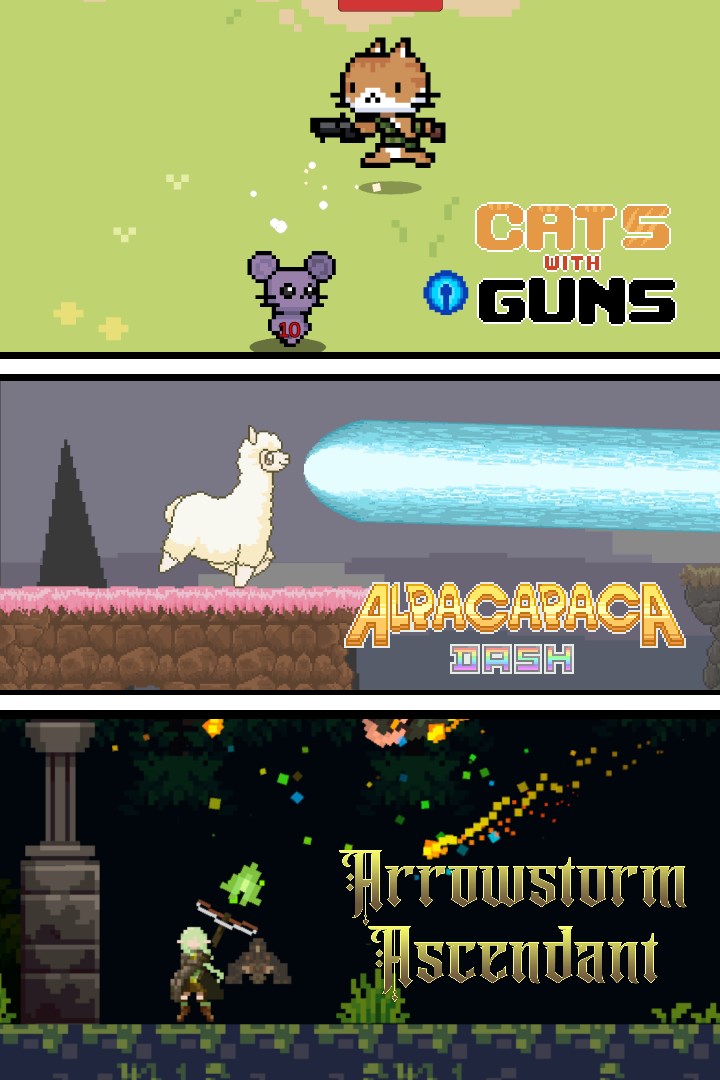
SC Games Triple Bundle
Details
- Publisher
- Synnergy Circle Games
- Developer
- Synnergy Circle Games
- Release date
- 21.11.2024
- Age rating
- ESRB:E10
- Localization
- English
Purchase options
Platform
Primary: our account is set as the home Xbox of your console ("My home Xbox"), so the game is shared with your own profile and works offline — that is one slot on one console. Secondary: you sign in to our account and launch the game from it, and the console has to stay online. The activation code is an extra option: it is redeemed on your own account, and the game stays there forever.
You install the game from our account and set our account as the home one ("My home Xbox"): after that you play from your own profile, and the progress and achievements stay yours. It works offline.
You sign in to our account and play right from it. A permanent internet connection is required and only the issued profile can be used. It costs less than the primary access.
A bonus way to buy: you get a 25-character code and redeem it on your own account. The game stays with you forever, no other profiles and no sign-in to a shared account.
What happens after payment
About the game
This is a bundle featuring 3 casual games developed and published by Synnergy Circle Games for both Windows and Xbox. Take this chance to complete your collection!
Game 1: Arrowstorm Ascendant
Arrowstorm Ascendant is a rogue-like shoot 'em up based on "Seraph's Last Stand" and "Vampire Survivors". Control a archer and defeat hordes of dragons with your outstanding archery skills. With each new wave the enemies increase in number and power, but don't worry, because you will also be granted the opportunity to grow and upgrade your skills by selecting a skill card after defeating a wave of enemies. Use this to you advantage to create the most interesting, powerful and game breaking build and prove you are worthy of getting the title Arrowstorm Ascendant by defeating Elzret, The Flying Calamity and King of Dragons.
You lose your upgrades after finising an expedition, but all the coins found will stay with you. Use these coins to increase your arsenal of skills and archers. A wider range of skills will unlock more synergies and combinations. The upgrade cards are an essential asset you need to grow and evolve your archer to survive as the game gets harder. Choose between red skill cards, that increase your stats, blue skill cards, that gives support and passive abilities or green cards, that gives new powers or upgrade your arrows new skills. By combining the correct green and blue cards and reaching them to level 5 the enemies may drop a gold anvil, that can be used to craft a gold skill card, with insanely powerful abilities.
You can choose 4 green cards and 4 blue cards after each wave. Find the best build possible and reach the highest level you can!
--------------------------------------------------------------------------------------------------------------------
Game 2: Alpacapaca Dash
Alpacapaca Dash is a 2D run and shoot game where you are the last hope of saving the Alpaca World from eternal darkness! Control the last alpaca and run through the world, using your mighty Alpaca Beam to destroy evil your hooves to purify and restore the world to what it once was. Do you have what it takes to save the alpaca goddess?
--------------------------------------------------------------------------------------------------------------------
Game 3: Cats with Guns
Cats with Guns is a 2D casual game with rogue-lite elements, where you can make strategic decisions on the middle of the battle and go from a small kitten to a powerful and intimidating feline. Evolve your cat and overwhelm the enemy forces with powerful abilities. Fight sheer enemy numbers with a huge firepower and defeat the generals until you reach Meowstopia.
The game is set in the outskirts of Meowstopia, where cats once lived happily until it was invaded by rats, forcing them to flee. Now, a determined group of cats, known as The Nine Lives Brigade, is fighting to reclaim their city from the rat hordes. The game's premise revolves around the cats battling through waves of enemies to eventually face the leader of the rat invasion.
Screenshots
Click a frame to open it larger, use the arrows to browse
How to activate
Guide for Xbox One
Primary — the game is shared with your own profile
- 1Press the Xbox button, open "Profile & system" → "Add or switch" → "Add new" and sign in with the login and password from your order.
- 2Now open "Settings" → "General" → "Personalization" → "My home Xbox" and choose "Make this my home Xbox". This is what shares our games with every profile on your console.
- 3Switch back to your own profile, open "My games & apps" → "Library" and install the game. The internet is only needed for the download.
- 4Launch the game from your own profile: achievements, saves and progress stay yours, and after the installation the game works offline.
Only one console at a time can be the home Xbox for our account — that is the slot you bought. Please do not change the password, the email or the two-factor settings of the account, or the access will be blocked.
Secondary — you play from our account
- 1Press the Xbox button, open "Profile & system" → "Add or switch" → "Add new" and sign in with the login and password from your order.
- 2Open "My games & apps" → "Library", switch to our profile in the top-left corner and install the game.
- 3Launch the game while our profile stays signed in, and keep the console online: the licence is checked over the internet.
- 4Use your own profile for everything else — the game stays available as long as our account is signed in on this console.
Secondary costs less, but it needs a permanent internet connection and our account stays signed in on your console.
Activation code
- 1On the console open "Store" and go to the "Redeem code" section.
- 2Enter the 25-character code from your order and confirm the activation on your own account.
- 3After the activation the code is shown as "Used" — but you can reinstall the game from your library at any time.
Notes for Xbox One
Important
How to play online
Warranty and support
The warranty covers the whole period of use of the account. If the access stops working, we replace the account or refund your money.
- If the game stops launching, we replace the account or refund your money.
- Average support response time — 15–30 minutes during working hours.
- The warranty covers the whole rental period of the access.
Support
Telegram: @weskars
E-mail: support@gears.games
Working hours: daily 11:00 – 23:00 (UTC+3)
Every order goes through clear stages: "New" → "Awaiting payment" → "Paid" → "Delivered". You can follow the status in your account page.
Similar games
More games in the "Action & adventure" genre



