Nachtmahr
Details
- Publisher
- Mangy Goblin Games, LLC
- Developer
- Mangy Goblin Games, LLC
- Release date
- 02.09.2025
- Age rating
- ESRB:E
- Localization
- English
Purchase options
Primary: our account is set as the home Xbox of your console ("My home Xbox"), so the game is shared with your own profile and works offline — that is one slot on one console. Secondary: you sign in to our account and launch the game from it, and the console has to stay online. The activation code is an extra option: it is redeemed on your own account, and the game stays there forever.
You install the game from our account and set our account as the home one ("My home Xbox"): after that you play from your own profile, and the progress and achievements stay yours. It works offline.
You sign in to our account and play right from it. A permanent internet connection is required and only the issued profile can be used. It costs less than the primary access.
A bonus way to buy: you get a 25-character code and redeem it on your own account. The game stays with you forever, no other profiles and no sign-in to a shared account.
What happens after payment
About the game
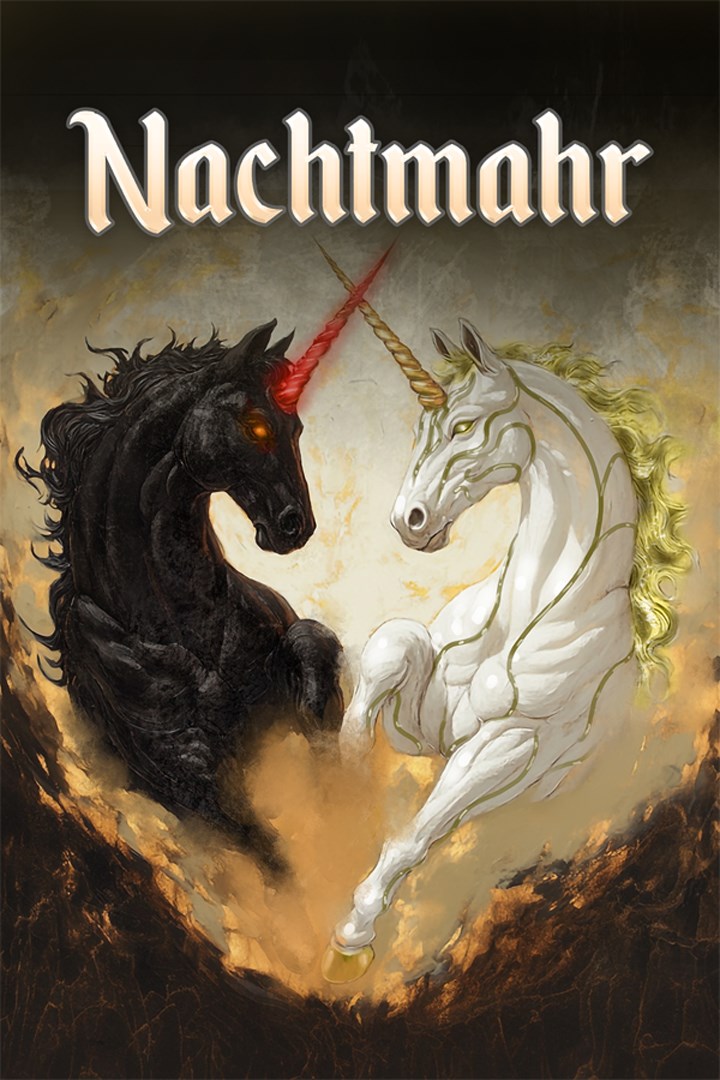
Nachtmahr is a single-player, third-person adventure where you become a mythical unicorn bound by magic and mystery. Experience five breathtaking realms, each with its own haunting beauty, original soundtrack, and secrets waiting to be unraveled.
Solve ancient puzzles, uncover lost memories, and collect fragments of a forgotten past as you awaken the poetic story hidden deep within the world.
In Nachtmahr, every step reveals wonder…and every shadow whispers of something greater.
What Nachtmahr is:
• Nachtmahr is a solo developed game, that was originally intended as a gift and to challenge the developer’s daughter.
• Nachtmahr is an exploration. It is a discovery.
• Nachtmahr is a puzzle to be solved.
• Nachtmahr is a serene experience…a walk in the woods on a quiet day.
• Nachtmahr allows players to poke around the entire world. The player seeks out the puzzles to solve.
• Nachtmahr is an adventure at a different pace. The player decides how to explore the world and what to do.
• Nachtmahr is about thinking, decision-making, trial and error, and experimentation. Players need to engage their brain.
What Nachtmahr is not:
• Nachtmahr is not from a AAA studio.
• Nachtmahr is not about a score.
• Nachtmahr is NOT a shoot ‘em up with nonstop action onslaught.
• Nachtmahr is not a game that spoonfeeds the player. Players have to work for it.
• Nachtmahr is not a game where the best button-smasher beats it.
• Nachtmahr is not a game where the players blindly follow the bread crumb trail to deliver them to every destination.
Latest Patch Notes:
• The latest game patch contains major changes and bug fixes. The most notable is the new Game Compass. This is a new game setting that is off by default but can be enabled via the Game Settings menu. When enabled, key items, objects, puzzles and zones will be marked on the compass to help keep you on the right path. Other notable changes/fixes include:
• Engine level game breaking bugs that could cause interactable objects to silently reset their values, causing states to save that did not match with the actions as well as cause DataLayer loading crashes. These were game breaking bugs.
• Reworked some puzzle positions to make things more clear.
• Reworked zone transition tunnels.
• Auto save now increments through 5 slots, allowing breaking bugs to be recovered from.
• Reduced loading aggressiveness on consoles. This will slow load time but prevent crashes.
• Created a restore system that will restore Objects to their proper saved state on reload if they had not properly triggered.
Lastly, if you experience any bugs or issues, please reach out to use at https://mangygoblingames.com/support so we can address them right away! We value your input and time to help make this game an experience that can be enjoyed by all.
Screenshots
Click a frame to open it larger, use the arrows to browse
How to activate
Guide for Xbox Series X|S
Primary — the game is shared with your own profile
- 1Press the Xbox button, open "Profile & system" → "Add or switch" → "Add new" and sign in with the login and password from your order.
- 2Now open "Settings" → "General" → "Personalization" → "My home Xbox" and choose "Make this my home Xbox". This is what shares our games with every profile on your console.
- 3Switch back to your own profile, open "My games & apps" → "Library" and install the game. The internet is only needed for the download.
- 4Launch the game from your own profile: achievements, saves and progress stay yours, and after the installation the game works offline.
Only one console at a time can be the home Xbox for our account — that is the slot you bought. Please do not change the password, the email or the two-factor settings of the account, or the access will be blocked.
Secondary — you play from our account
- 1Press the Xbox button, open "Profile & system" → "Add or switch" → "Add new" and sign in with the login and password from your order.
- 2Open "My games & apps" → "Library", switch to our profile in the top-left corner and install the game.
- 3Launch the game while our profile stays signed in, and keep the console online: the licence is checked over the internet.
- 4Use your own profile for everything else — the game stays available as long as our account is signed in on this console.
Secondary costs less, but it needs a permanent internet connection and our account stays signed in on your console.
Activation code
- 1On the console open "Store" and go to the "Redeem code" section.
- 2Enter the 25-character code from your order and confirm the activation on your own account.
- 3After the activation the code is shown as "Used" — but you can reinstall the game from your library at any time.
Notes for Xbox Series
Important
How to play online
Warranty and support
The warranty covers the whole period of use of the account. If the access stops working, we replace the account or refund your money.
- If the game stops launching, we replace the account or refund your money.
- Average support response time — 15–30 minutes during working hours.
- The warranty covers the whole rental period of the access.
Support
Telegram: @weskars
E-mail: support@gears.games
Working hours: daily 11:00 – 23:00 (UTC+3)
Every order goes through clear stages: "New" → "Awaiting payment" → "Paid" → "Delivered". You can follow the status in your account page.
Similar games
More games in the "Platformer" genre