
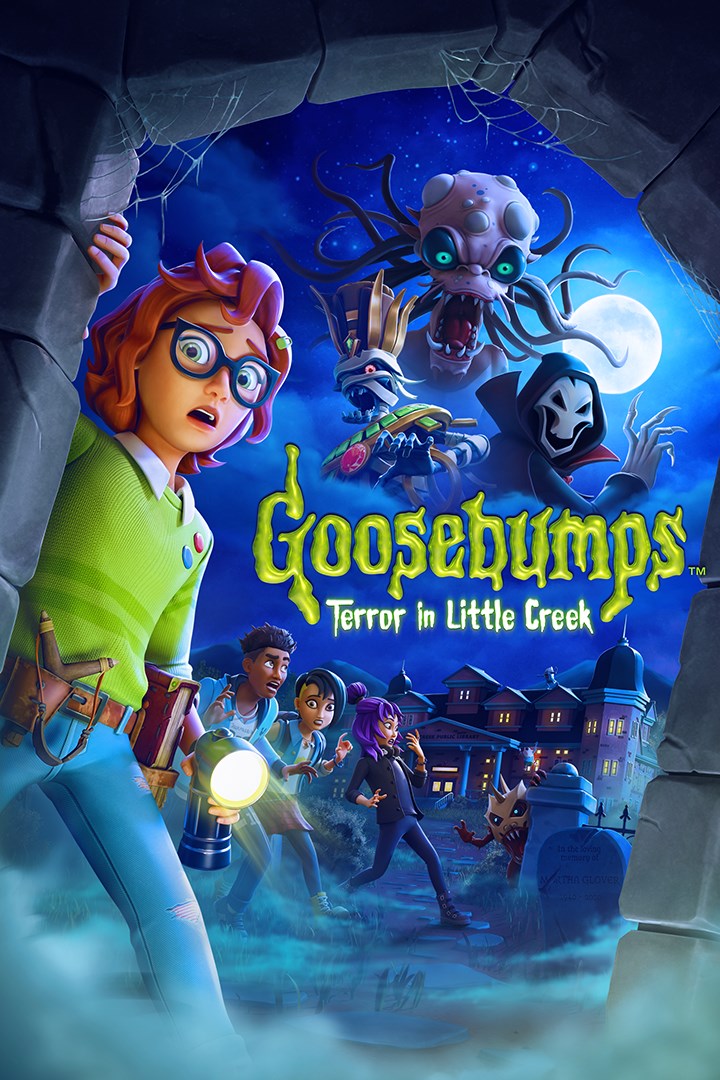
Goosebumps: Terror in Little Creek
Details
- Publisher
- GameMill Entertainment
- Developer
- PHL Collective
- Release date
- 29.08.2025
- Age rating
- ESRB:E10
- Localization
- English
Purchase options
Primary: our account is set as the home Xbox of your console ("My home Xbox"), so the game is shared with your own profile and works offline — that is one slot on one console. Secondary: you sign in to our account and launch the game from it, and the console has to stay online. The activation code is an extra option: it is redeemed on your own account, and the game stays there forever.
You install the game from our account and set our account as the home one ("My home Xbox"): after that you play from your own profile, and the progress and achievements stay yours. It works offline.
You sign in to our account and play right from it. A permanent internet connection is required and only the issued profile can be used. It costs less than the primary access.
A bonus way to buy: you get a 25-character code and redeem it on your own account. The game stays with you forever, no other profiles and no sign-in to a shared account.
What happens after payment
About the game
Dark Secrets Await. Unravel the Truth.
Enter the chilling world of Goosebumps in Goosebumps: Terror in Little Creek! Step into the shoes of Sloane Spencer, a young teen caught in a town of nightmares, as you unravel eerie mysteries, confront sinister monsters, and navigate haunted locations inspired by R.L. Stine’s legendary book series. Solve puzzles, evade creatures, and uncover the dark secrets lurking in the shadows—all while experiencing the Goosebumps signature blend of spooky adventure and playful twists that has captivated millions of fans both young and young at heart.
Key Game Features:
ORIGINAL GOOSEBUMPS STORY – Experience a brand-new Goosebumps mystery, crafted exclusively for the game. Encounter fresh terrors inspired by the book series while uncovering the unsettling truths hidden within the town of Little Creek.
SUSPENSEFUL EXPLORATION – Traverse the fog-filled streets of Little Creek, creep through abandoned theaters, and sneak through dark libraries teeming with secrets. Every shadow hides a new spooky surprise waiting to be uncovered.
MYSTERIOUS CHALLENGES – Test your wits with mind-bending puzzles, interactive contraptions, and clever riddles that stand between you and the truth behind Little Creek’s supernatural happenings.
STAY ONE STEP AHEAD OF LURKING THREATS! Use stealth and cunning to evade terrifying monsters or fight back using your trusty slingshot and the help of a haunted book you’ve discovered.
MONSTERS OF THE UNKNOWN – Face a dreadful roster of monsters, inspired by classic Goosebumps frights but reimagined for an all-new nightmare-filled experience. Survive their relentless pursuit and uncover their dark origins.
MULTIPLE ENDINGS – Your choices shape the fate of Sloane and her friends. Can you unearth the full truth behind Little Creek’s horrors, or will the town’s mysteries consume you?
Screenshots
Click a frame to open it larger, use the arrows to browse
How to activate
Guide for Xbox Series X|S
Primary — the game is shared with your own profile
- 1Press the Xbox button, open "Profile & system" → "Add or switch" → "Add new" and sign in with the login and password from your order.
- 2Now open "Settings" → "General" → "Personalization" → "My home Xbox" and choose "Make this my home Xbox". This is what shares our games with every profile on your console.
- 3Switch back to your own profile, open "My games & apps" → "Library" and install the game. The internet is only needed for the download.
- 4Launch the game from your own profile: achievements, saves and progress stay yours, and after the installation the game works offline.
Only one console at a time can be the home Xbox for our account — that is the slot you bought. Please do not change the password, the email or the two-factor settings of the account, or the access will be blocked.
Secondary — you play from our account
- 1Press the Xbox button, open "Profile & system" → "Add or switch" → "Add new" and sign in with the login and password from your order.
- 2Open "My games & apps" → "Library", switch to our profile in the top-left corner and install the game.
- 3Launch the game while our profile stays signed in, and keep the console online: the licence is checked over the internet.
- 4Use your own profile for everything else — the game stays available as long as our account is signed in on this console.
Secondary costs less, but it needs a permanent internet connection and our account stays signed in on your console.
Activation code
- 1On the console open "Store" and go to the "Redeem code" section.
- 2Enter the 25-character code from your order and confirm the activation on your own account.
- 3After the activation the code is shown as "Used" — but you can reinstall the game from your library at any time.
Notes for Xbox Series
Important
How to play online
Warranty and support
The warranty covers the whole period of use of the account. If the access stops working, we replace the account or refund your money.
- If the game stops launching, we replace the account or refund your money.
- Average support response time — 15–30 minutes during working hours.
- The warranty covers the whole rental period of the access.
Support
Telegram: @weskars
E-mail: support@gears.games
Working hours: daily 11:00 – 23:00 (UTC+3)
Every order goes through clear stages: "New" → "Awaiting payment" → "Paid" → "Delivered". You can follow the status in your account page.
Similar games
More games in the "Action & adventure" genre



